Starship 終端提示符配置指南
來源: @hemashushu | 原文連結
日期: Fri Dec 05 10:13:05 +0000 2025
標籤:
終端配置開發工具Shell提示符
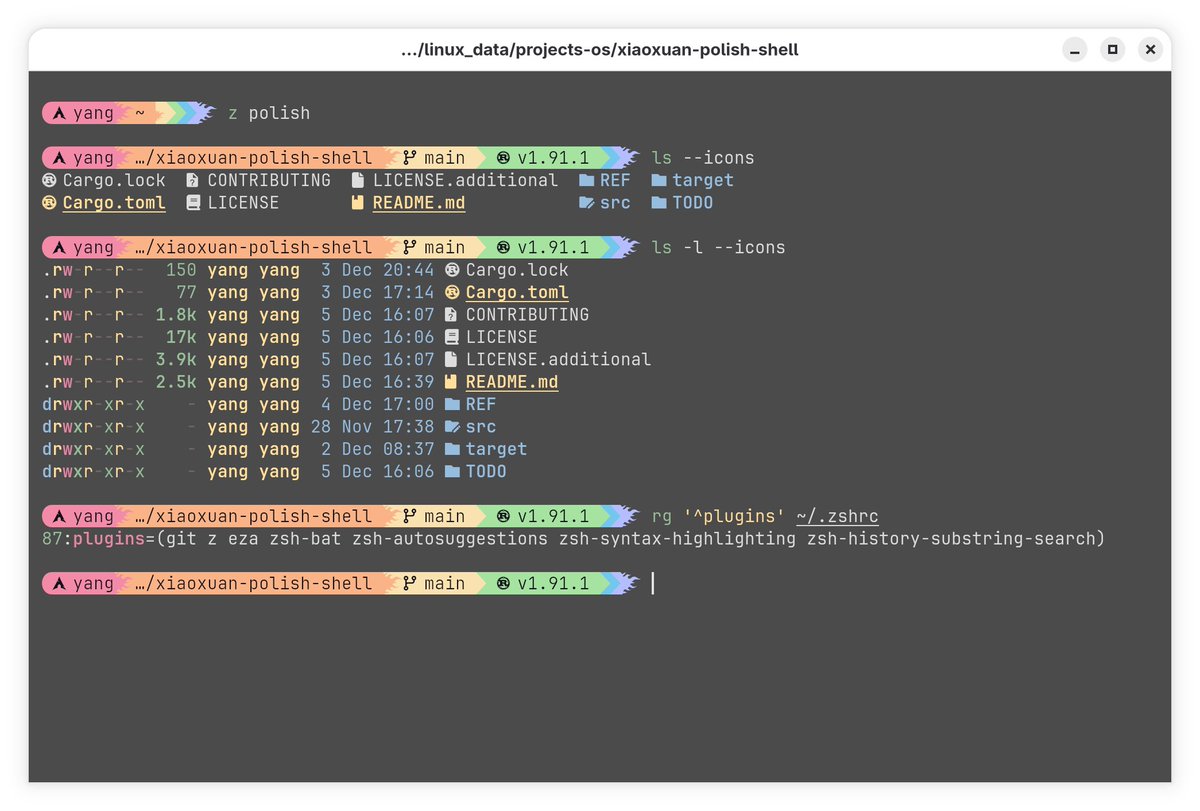
概述
Starship 是一個用 Rust 編寫的跨平台終端提示符(prompt)工具,具備以下特點:
- 極簡高效:Rust 帶來一流的速度與可靠性
- 跨平台相容:支援主流作業系統與 Shell(Bash、Zsh、Fish、PowerShell 等)
- 高度可自訂:從極簡到功能豐富都能靈活配置
★ Insight ─────────────────────────────────────
- 為何選擇 Rust 編寫的工具:相比傳統 Shell Script 實作的提示符,Rust 編譯型語言能提供更快的啟動速度,這對每次開啟終端都會執行的提示符來說至關重要
- Nerd Fonts 的重要性:現代終端提示符大量使用圖示來顯示 Git 狀態、程式語言版本等資訊,Nerd Fonts 包含豐富的圖示字體,是視覺呈現的基礎 ─────────────────────────────────────────────────
前置需求
- 已安裝並啟用 Nerd Font 字型
安裝步驟
1. 安裝 Starship 二進位檔案
方法一:Shell 腳本安裝(推薦)
bash
curl -sS https://starship.rs/install.sh | sh更新時重新執行相同指令即可,不會影響現有配置。
方法二:套件管理器安裝
macOS/Linux (Homebrew):
bash
brew install starshipWindows (Winget):
powershell
winget install starship2. 將初始化腳本加入 Shell 配置檔
根據你使用的 Shell,在對應的配置檔末尾加入以下內容:
| Shell | 配置檔路徑 | 初始化指令 |
|---|---|---|
| Bash | ~/.bashrc | eval "$(starship init bash)" |
| Zsh | ~/.zshrc | eval "$(starship init zsh)" |
| Fish | ~/.config/fish/config.fish | starship init fish | source |
| PowerShell | ~\Documents\PowerShell\Microsoft.PowerShell_profile.ps1 | Invoke-Expression (&starship init powershell) |
| Elvish | ~/.config/elvish/rc.elv | eval (starship init elvish) |
| Nushell (v0.96+) | 執行 $nu.config-path 查看 | 見下方說明 |
| Tcsh | ~/.tcshrc | eval `starship init tcsh` |
| Xonsh | ~/.xonshrc | execx($(starship init xonsh)) |
| Cmd (需搭配 Clink v1.2.30+) | Clink scripts 目錄下的 starship.lua | load(io.popen('starship init cmd'):read("*a"))() |
Nushell 特殊設定
bash
# 建立自動載入目錄
mkdir ($nu.data-dir | path join "vendor/autoload")

# 產生初始化腳本
starship init nu | save -f ($nu.data-dir | path join "vendor/autoload/starship.nu")
推薦組合配置
搭配 Kitty Terminal + ZSH + Starship,可獲得兼顧效率與美觀的開發環境。
常用 ZSH 插件
| 插件名稱 | 功能說明 |
|---|---|
| z | 智慧目錄跳轉(根據歷史記錄) |
| eza | 改良版 ls,更美觀的檔案列表顯示 |
| zsh-bat | 改良版 cat,支援語法高亮 |
| zsh-autosuggestions | 根據歷史記錄自動建議指令 |
| zsh-syntax-highlighting | 指令語法即時高亮顯示 |
| zsh-history-substring-search | 改進的歷史記錄搜尋功能 |
★ Insight ─────────────────────────────────────
- 插件組合哲學:這套配置遵循「最小干擾、最大效率」原則 —
z減少cd指令輸入、autosuggestions避免重複打字、syntax-highlighting即時發現拼寫錯誤 - Kitty + ZSH 的協同優勢:Kitty 支援 GPU 加速渲染與豐富的圖形協議,搭配 ZSH 的強大補全系統與 Starship 的快速提示符,形成高效能終端鐵三角 ─────────────────────────────────────────────────
配置調整
Starship 的配置檔位於 ~/.config/starship.toml,可根據需求自訂:
- 顯示/隱藏特定資訊(Git 狀態、語言版本、執行時間等)
- 調整顏色與樣式
- 設定條件顯示規則
詳細配置選項參見 官方文件。